由於日本對網路控管嚴格,某些網站需要日本本地ip才能夠登入訪問
這時就需要它拉!!
「PacketiX」是赫赫有名的SoftEther提供的非商業性學術版免費VPN服務,
速度超快,透過它可以破解封鎖非日本IP位址的網站。與系統內建的VPN服務不同,使用 PacetiX.NET 必須藉由一套專門的用戶端工具並匯入相關設定檔。
PacketiX VPN Client
軟體性質︰Freeware
版本代碼︰2.2
適用系統︰Windows XP
檔案大小︰14.8 MB
語言介面︰英文
原創作者︰SoftEther Corporation
下載位址︰
PS:公司如果有擋msn,FB等 ,也可以利用此軟體來繞過防火牆瀏覽
使用說明:
點選視窗內的Create New VPN 按右鍵 選擇"Import VPN Connecting Setting"
選擇剛剛存在電腦的自動設定檔 它會自動匯入做設定
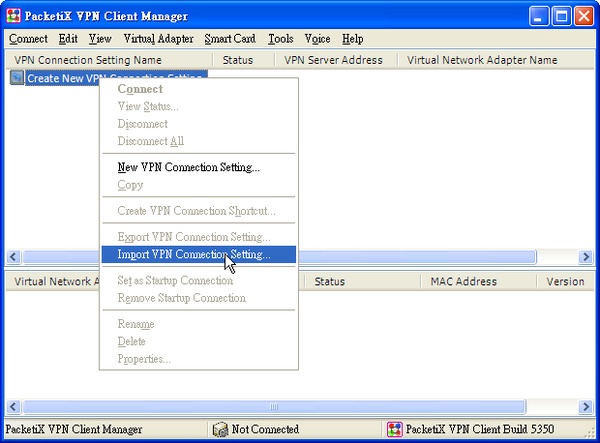
2. 選擇 Secure 並按下右鍵 選擇 connect

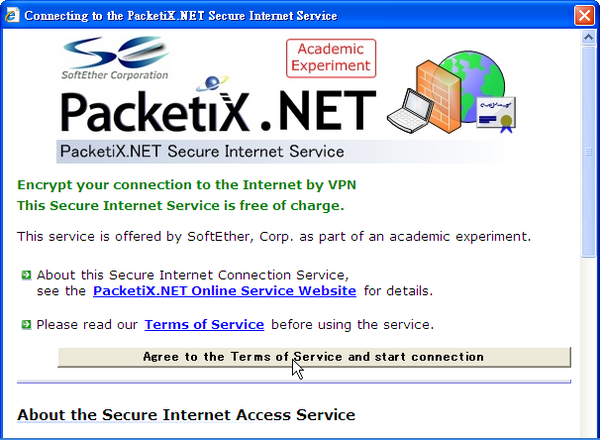
3.此時會出現一個視窗 點選 "Agree to the Terms of Service and start connection"
即可使用
現在 就請 盡情享用吧 切記 免費資源得來不易 請好好珍惜

We appreciate you like our blog:)We also thought your blog is great about photography for beginner to learn.
回覆刪除Thanks again! Keep doing share techniques and knowledge for everybody.Give you a Thumb!